See every voyage. Fix delays before they happen.
Your services on one timeline: port rotations, voyages and ETAs, with conflicts flagged as they appear and every change carried on down the schedule.
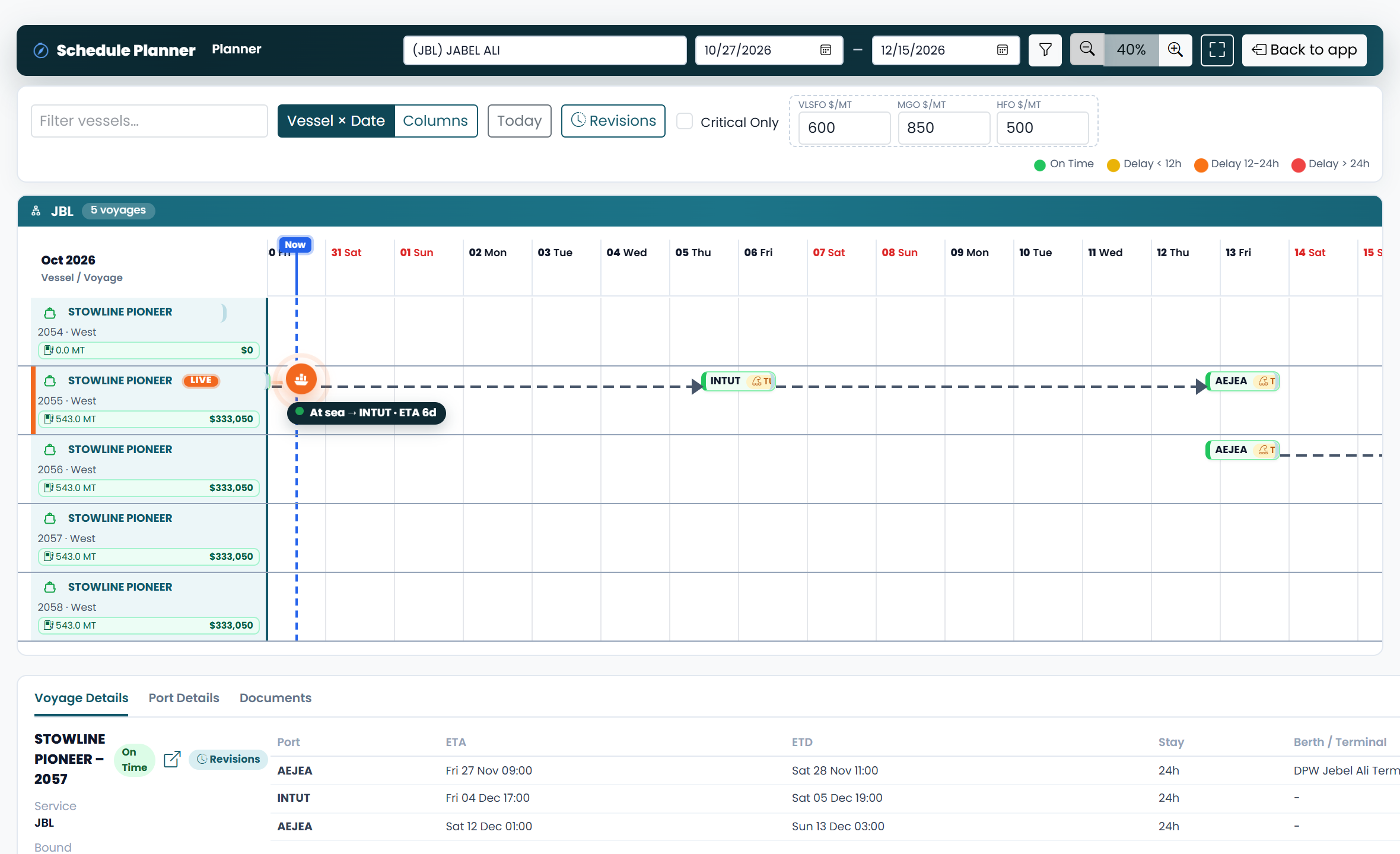
Everything a liner schedule needs.
The schedule board
Every voyage of a service on one timeline, in a normal or turned view, with zoom.
Drag to replan
Drag a call to change the speed, reorder the ports or stretch a port stay; the ETAs after it move with it.
Conflicts flagged
Overlapping voyages and calls that miss their berth window are flagged as you plan, and delays show by how late they run.
Changes carried on
A change carries forward into the next voyage on the service, so the chain of voyages stays in step.
Fuel impact first
See what a speed change does to the fuel before you save it.
Revisions and change log
Each voyage keeps its versions to compare, restore or mark final; the board logs who changed what, from what, and why.
Berth windows
Keep each service's berth windows and see which calls fall outside them.
Schedule viewer
Find sailings by service, port, POL and POD or route; filter, group, chart, export to Excel or print.
Port call reports
Arrival, departure and TOS reports for each call, and the port rotation, in Excel.
From the service to the reports.
Set up the services
Services, routes, vessels, ports and terminals, typed in or imported from Excel.
Build the voyages
Each voyage's port rotation, its ETAs starting from the vessel's previous voyage.
Plan on the board
Drag to replan, see conflicts and the fuel impact, and let changes carry down the schedule.
Report and share
Mark a revision final, fill the port call reports and share the schedules in Excel.
Can it show schedule deviation?
Yes. Delays show by how late they run, and calls outside their berth window or overlapping are flagged as you plan.
Can I plan a weekly schedule?
Yes. Each service keeps its weekly berth windows, port by port and day by day, and the board shows the calls that fall outside them, so the service stays on its weekly schedule.
Does it track ETA, ETB and ETD?
Yes. Each call has its ETA, ETB and ETD, and changing one moves the calls after it. The board also shows where the vessel is now against the plan.
Does it help with vessel deployment?
Yes. Every voyage of a service shows on one board, port rotation by port rotation, and the Voyage Estimator compares vessels on the trade before you deploy them.
How do I create a vessel schedule?
Set up the service and its routes, build each voyage's port rotation, and the board lays the voyages out on a timeline with their ETAs. Drag a call to replan.
Can several people plan at the same time?
Yes. One person edits a schedule at a time: the others see it locked, with who has it, and the change log keeps every edit with its reason.
What happens to the following voyages when I change one?
The change carries forward into the next voyage on the service, so the voyages stay in step.
Can I go back to an earlier version of a voyage?
Yes. Each voyage keeps its versions: compare two, restore one or mark one as final.
Can we bring in our existing data?
Services, routes, vessels, ports, terminals and the other masters import from Excel, and export to it.
Does it work with the Voyage Estimator?
Yes. Both work on the same vessels, ports and tariffs, so nothing is typed twice.
Let us set up your trial.
Tell us about your operation and when suits you. We will write back to confirm a meeting and get your organisation set up.
Thank you. Your request is with us.
We will write to to confirm the meeting and set up your trial.